
Audit a Shopify Theme Before It Goes Live: What to Check and Where to Fix It
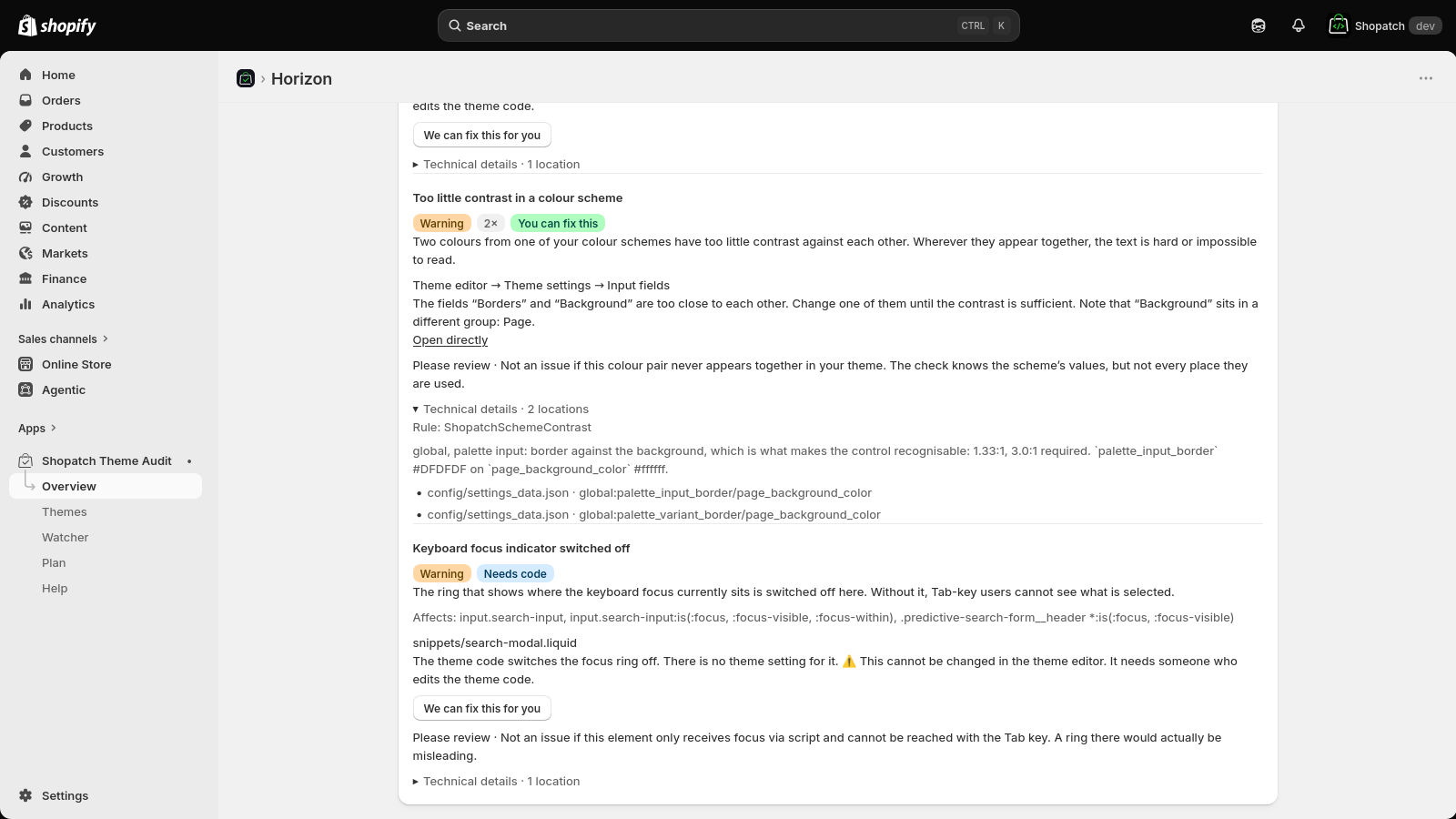
Short answer: A theme audit is only useful if every finding comes with three things: the file, the exact spot, and the place in your Shopify admin where you change it. “Contrast too low on button text” is a fact. “Theme settings → Colour scheme 1 → field Links” is an instruction. Shopatch Theme Audit checks the theme where it is made, including unpublished themes and every colour scheme, and it says plainly which findings you can fix yourself and which ones need a developer.
Tools that crawl your live website share two blind spots, and both of them matter most at exactly the wrong moment. They can only see the theme that is published, so they are useless during the week before a relaunch. And they can only see the colour scheme that happens to be rendered, so a scheme you use on two landing pages goes unchecked until a customer runs into it.
Why this is on the table right now
The European Accessibility Act has applied since June 28, 2025, and national implementations such as Germany’s BFSG cover e-commerce, with an exemption for microenterprises under ten employees and at most two million euro in annual turnover.
Whether your store falls under it, and what exactly it then has to do, is a legal question and not one this page answers. The technical half can be answered: which places in the theme are likely to cause problems, where they are, and where you change them.
What actually gets checked
The checks fall into six groups. All of them run against the theme’s own files and the store’s structured data, not against a rendered page.
Liquid and HTML
| Check | What it finds |
|---|---|
| Missing alt attribute | Images that a screen reader announces as nothing, or as a file name |
Invalid sizes on responsive images | A sizes value the browser cannot use, so it loads the wrong file |
aria-hidden on a focusable element | An element hidden from screen readers that keyboard users still land on |
Positive tabindex | Tab order that jumps around the page instead of following it |
| Form field without a label | The single most common reason a checkout or newsletter field is unusable by voice control |
| Insecure URL | An asset or link on http:// inside an https:// page |
| Google Fonts loaded from the CDN | A third-party request that leaves your visitor’s IP address with another company, which in the EU is a consent question, not a performance one |
CSS
| Check | What it finds |
|---|---|
| Focus outline removed | outline: none without a replacement, which makes keyboard navigation invisible |
| Double dimming | Text that is faded twice, once by colour and once by opacity, and ends up below any readable contrast |
| Form fields that trigger iOS zoom | Inputs under 16px, where Safari zooms the whole page on focus and the layout jumps |
Colour schemes
Contrast is measured across every colour scheme in the theme, not just the active one. Themes in the Online Store 2.0 generation ship with several schemes, and it is normal for one of them to have been set up quickly and never looked at again.
Theme schema
| Check | What it finds |
|---|---|
select default not among its options | A setting whose default value does not exist, so the editor silently falls back |
| Invalid range step | A range setting Shopify will reject when the theme is uploaded |
| Locale key budget | Themes have a hard limit of 3,400 translation keys. Hitting it during a launch is a bad time to find out |
Catalogue
Product titles and descriptions are measured against the width a search result actually gives you, so you see which titles will be cut off before Google cuts them.
Store policies
The app checks whether legal notice, privacy policy, terms and refund policy exist. Not whether they are sufficient. Those texts live in Shopify’s shopPolicies rather than as ordinary pages, which is why a store can have nineteen pages and none of the four.
Every finding says how certain it is
A static check on template code cannot always know what ends up on the page. An image whose alt text comes from a metafield is a different case from one with no alt attribute at all. So each finding carries its confidence and, more usefully, what would refute it. That single line is the difference between a list you work through and a list you learn to ignore.
The part that only shows up on the second run
One run is a snapshot. From the second run on you get a history: what is new, what was fixed and when, and what had been fixed once and came back. Recurrences are the interesting category, because they usually mean a process problem rather than a code problem, and without a record nobody notices a single one.
This is also the honest version of the compliance argument. Against a regulator or a warning letter, a single document proves one day. A continuous record proves ongoing effort, and it cannot be produced after the fact.
The watcher
The paid tier runs the check on a schedule and mails you only when something changed. A notice that arrives every week whether or not anything happened gets filtered within a month.
The address is yours to choose, and it does not have to be the store owner’s. Agencies and freelance developers usually want the notice themselves, because they are the ones who will act on it.
What it does not do
It changes nothing in your store. The app does not request write_themes at all, which means it cannot edit your theme even by accident.
It issues no certificate of compliance. Whether a legal text is sufficient is a legal question, not a programming one, and a tool that claims otherwise is repeating a mistake that has already cost another vendor a million dollars.
And it checks the code, not the rendered page. Load time and text baked into images are not covered. That limitation is printed in every report rather than hidden in a FAQ.
What it costs
| Free | Watcher, 20 USD per 30 days |
|---|---|
| Complete findings with file, exact spot and admin location | same |
| Current report as a downloadable file | same |
| The last 2 runs | unlimited |
| not included | History, regressions, recurrences |
| not included | Scheduled checks, notice only when something changed |
| not included | Draft of the accessibility statement |
There is no trial, and that is deliberate. The free tier is not a preview with the findings blurred out: you see exactly what your store has. Withholding findings from a merchant about their own store would tell them their shop is in better shape than it is. What you pay for is what accrues over time.
Hidden runs are not deleted either. Subscribe later and your history comes back instead of starting at zero.
Getting started
- Install Shopatch Theme Audit from the Shopify App Store.
- Open Themes in the app. Every theme in your store is listed there, the live one and the unpublished ones.
- Click Check next to the theme you want to look at. The first report takes under a minute.
- Read the result. Findings are split into In the theme and In your shop data, and each one is marked You can fix this or Needs code.
- Open a finding to see the file, the exact spot and the place in your admin where you change it.
- After you have fixed something, check the theme again. The report shows what changed since the last run. You can also download it as PDF or Markdown and hand it to whoever does the work.
The free tier is enough to see whether the list is worth your time.
More detail on the product page at Theme Audit. If you would rather have the findings fixed than fix them, that is a service we offer.